
How to set up GST e-invoicing for your auto workshop (step-by-step)
A practical, no-jargon guide to GST e-invoicing compliance for Indian auto workshops — from IRP registration to daily workflow.
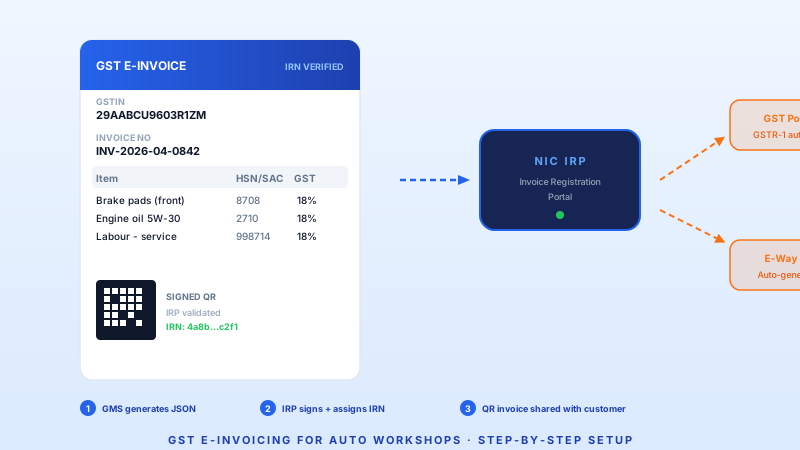
GST e-invoicing is now mandatory for businesses with aggregate turnover above ₹5 crore — and the threshold keeps dropping. If you run an auto workshop or service chain in India, here is the complete, no-jargon setup guide.
Who needs GST e-invoicing?
As of April 2026, e-invoicing applies to any business (including auto workshops) whose aggregate annual turnover exceeded ₹5 crore in any financial year from 2017-18 onwards. The government has signalled it will drop to ₹1 crore by FY 2027 — so even mid-size independent workshops should prepare now.
What e-invoicing actually means
E-invoicing does not mean emailing a PDF. It means:
- Your billing software generates a JSON invoice in the prescribed schema.
- That JSON is sent to the Invoice Registration Portal (IRP) — currently NIC's portal.
- The IRP validates it, assigns an Invoice Reference Number (IRN) and a digitally signed QR code.
- The signed invoice returns to your software and is shared with the customer.
- The IRP simultaneously pushes the data to the GST portal and (optionally) the e-way bill system.
The customer's GSTR-2A/2B auto-populates. No manual reconciliation needed.
Step-by-step setup for workshops
Step 1: Check your turnover threshold
Log in to the GST portal. If your aggregate turnover crosses ₹5 crore, you're already required to comply. Penalty for non-compliance: the invoice is not valid for ITC claims — your B2B customers lose their input credit.
Step 2: Register on the IRP
Visit einvoice1.gst.gov.in. Register with your GSTIN. You'll get API credentials (client ID and client secret) that your billing software uses to push invoices.
Step 3: Ensure your GMS supports e-invoicing
Your garage management software needs to:
- Generate invoices in the NIC e-invoice JSON schema (version 1.1 as of 2026)
- Include correct HSN codes for parts (e.g., 8708 for motor vehicle parts) and SAC codes for labour services (e.g., 998714 for maintenance and repair)
- Call the IRP API, handle the signed response, and store the IRN + QR
- Print or share invoices with the embedded QR code
If your current software can't do this, it's time to switch.
Step 4: Map your HSN and SAC codes
This is where most workshops stumble. Common mappings:
| Item | Code type | Code | GST rate |
|---|---|---|---|
| Spare parts (general) | HSN | 8708 | 18% |
| Engine oil | HSN | 2710 | 18% |
| Tyres | HSN | 4011 | 28% |
| Labour (repair & maintenance) | SAC | 998714 | 18% |
| Car wash / detailing | SAC | 998512 | 18% |
Get these wrong, and you'll face mismatches during GST return filing.
Step 5: Test in sandbox
The IRP provides a sandbox environment. Push 10-15 test invoices covering your common scenarios: parts-only, labour-only, parts + labour, warranty (zero-value lines), insurance (third-party billed). Fix schema errors here, not in production.
Step 6: Go live
Switch your GMS to the production IRP endpoint. Every B2B invoice now goes through e-invoicing automatically. B2C invoices below ₹1 lakh are currently exempt from e-invoicing but still need the QR code on the printed copy.
Common mistakes to avoid
- Wrong HSN granularity. Using a 4-digit HSN when 6 or 8 digits are required for your turnover bracket.
- Missing SAC on labour lines. Labour is a service — it needs a SAC code, not an HSN.
- Editing invoices after IRN generation. You can't edit a signed e-invoice. Issue a credit note and a fresh invoice instead.
- Not syncing to Tally / accounting software. The e-invoice data should flow to your books automatically — manual re-entry defeats the purpose.
- Ignoring debit/credit notes. These also need to go through the IRP if the original invoice was e-invoiced.
What happens if you don't comply?
- Your B2B customers cannot claim ITC on your invoices — they'll stop coming.
- Penalty of up to ₹50,000 per invoice for wilful non-compliance.
- GST audit scrutiny increases.
How GetAFix handles it
GetAFix WMS has built-in e-invoicing — IRP-registered, HSN/SAC pre-mapped for auto workshop scenarios, sandbox-tested, and live in hundreds of workshops. Setup takes under a day. Book a demo to see it.
Related reading
How to choose the best garage management software in India (2026 guide)
A practical buyers' guide for Indian auto workshops and garage chains — from single-bay independents to multi-city franchises.
AI in automotive workshops: hype vs. reality in 2026
Everyone claims AI. This post cuts through the noise — what AI actually does inside a working garage today, and what is still marketing.